

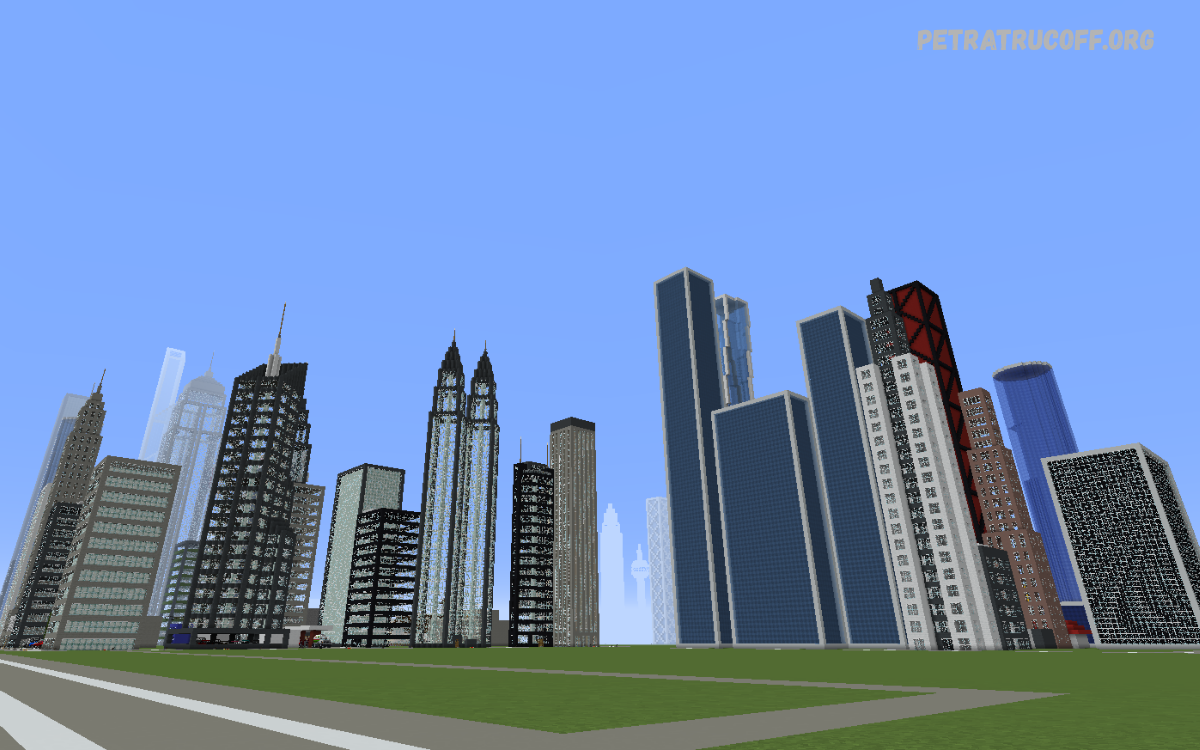
Minecraft City Build Ideas help players transform ordinary Minecraft worlds into impressive urban environments filled with modern buildings, beautiful streets, shopping centers, parks, and residential neighborhoods.
A successful Minecraft city combines attractive architecture, organized roads, realistic infrastructure, and detailed decorations. Players can start with a small neighborhood and gradually expand into a large metropolitan area featuring skyscrapers, airports, hospitals, schools, and entertainment districts.
Modern Minecraft City Build Ideas
Modern cities are among the most popular Minecraft building projects because they allow players to experiment with glass windows, concrete walls, stylish rooftops, and futuristic architecture.
For a modern city, choose a consistent architectural style and use materials such as white concrete, gray concrete, glass panes, quartz, and stone bricks. Add sidewalks, streetlights, traffic signals, and decorative trees to create a realistic urban atmosphere throughout the city.
Minecraft Skyscraper Build Ideas
Skyscrapers can become a Minecraft city’s main attraction, especially when they feature different heights, unique silhouettes, and detailed exterior designs. Build office towers, residential high-rises, hotels, and observation buildings to add variety to the skyline instead of repeating the same structure.
Use glass walls, concrete pillars, balconies, and rooftop decorations to make each tower distinctive. You can also build interior floors containing offices, apartments, elevators, meeting rooms, and rooftop gardens to make skyscrapers more interactive and useful.
Minecraft Modern House Build Ideas
Modern houses are excellent additions to residential neighborhoods because they introduce variety between larger commercial buildings. Try building minimalist homes with flat roofs, open windows, swimming pools, gardens, and spacious garages to create an attractive suburban environment.
Combine quartz, concrete, wood planks, and glass to achieve a clean architectural appearance. For additional detail, build front pathways, outdoor seating areas, fences, mailboxes, and small trees around each property to make the neighborhood feel welcoming.
Minecraft Apartment Building Ideas
Apartment buildings help create realistic residential districts while making efficient use of limited space. Build several apartment towers with different heights, balconies, rooftop facilities, and shared entrances to represent a growing urban population.
Inside each building, create furnished apartments with kitchens, bedrooms, bathrooms, and living rooms. Add elevators, staircases, laundry rooms, and underground parking to improve functionality and make every apartment complex feel like a complete residential development.
Minecraft City Road Design Ideas
Roads connect every part of a city and establish the foundation for an organized building layout. Design wide main roads for commercial districts, smaller residential streets, and dedicated pedestrian pathways to make movement between different neighborhoods easier.
Use black concrete or gray blocks for asphalt, white concrete for road markings, and yellow lines to separate traffic directions. Add crosswalks, turning lanes, intersections, traffic lights, and street signs to give the road network a more realistic appearance.
Minecraft Highway Build Ideas
Highways make large Minecraft cities appear more developed by connecting distant neighborhoods, industrial areas, and commercial districts. Build elevated roads, underground tunnels, and multi-lane highways to create transportation routes that extend across different landscapes.
Support elevated highways with concrete pillars and add guardrails, exit signs, and service roads for extra detail. You can also build highway interchanges where several routes meet, creating an impressive infrastructure project that makes your city look professionally planned.
Minecraft City Park Build Ideas
Parks introduce natural beauty into urban environments and provide peaceful spaces between busy roads and tall buildings. Create green spaces with grass, trees, flower gardens, benches, fountains, walking trails, and decorative ponds to make residential and commercial districts more attractive.
For larger parks, include playgrounds, picnic areas, outdoor stages, and sports courts. Use different tree types, flower colors, and terrain elevations to create visual variety, while carefully placed lanterns help keep the park attractive during nighttime exploration.
Minecraft Shopping Mall Build Ideas
Shopping malls are excellent landmarks for modern Minecraft cities because they combine impressive architecture with interactive interiors. Build a large structure featuring glass walls, multiple floors, escalator-style staircases, food courts, clothing stores, electronics shops, and spacious central corridors.
Decorate each shop with counters, display shelves, signs, and colorful product arrangements. Add a parking lot, entrance plaza, rooftop garden, and cinema to create a complete shopping destination that connects naturally with nearby roads and public transportation.
Minecraft Supermarket Build Ideas
A supermarket adds everyday functionality to a Minecraft city and works particularly well in residential neighborhoods. Create a wide building with automatic-style sliding doors, large windows, shopping aisles, checkout counters, storage rooms, and a dedicated delivery entrance.
Use item frames, barrels, chests, and colorful blocks to represent groceries, household supplies, and fresh produce. Add shopping carts, parking spaces, street signs, and a small garden outside to make the supermarket appear more realistic and visually interesting.
Minecraft City Hospital Build Ideas
Hospitals are important landmarks for any realistic city because they represent essential public services. Design a large medical complex with emergency entrances, patient rooms, reception areas, operating rooms, waiting rooms, and separate departments connected by corridors.
Use white concrete, light gray blocks, glass, and red accents to create a recognizable medical building. Add an ambulance bay, helicopter landing pad, parking area, landscaped entrance, and nearby pharmacy to complete the hospital district.
Minecraft School Build Ideas
Schools bring life to residential neighborhoods and provide opportunities for detailed interior construction. Build classrooms, science laboratories, libraries, computer rooms, cafeterias, administrative offices, and a large entrance hall within a well-organized educational complex.
Outside the school, create playgrounds, basketball courts, football fields, bicycle parking, and a bus pickup area. Decorate hallways with notice boards and signs, while using different classroom layouts to make the school feel active and suitable for a growing Minecraft city.
Minecraft University Campus Ideas
A university campus can become an impressive district featuring academic buildings, student housing, libraries, research centers, and recreational facilities. Arrange several buildings around a central courtyard with pedestrian pathways, green lawns, fountains, and decorative trees.
Create lecture halls with rows of seats, computer laboratories, study rooms, and student cafeterias inside the academic buildings. Add sports facilities, dormitories, and a campus library to give the university enough variety to stand out from ordinary city structures.
Minecraft Police Station Build Ideas
A police station adds another layer of realism to a modern Minecraft city. Design a recognizable building with reception desks, offices, meeting rooms, evidence storage, interview rooms, and secure garage areas for police vehicles.
Include a parking lot, exterior security lighting, marked entrances, and a small courtyard around the station. Place the building near major roads or a civic district so it connects logically with other public services and remains easy to find.
Minecraft Fire Station Build Ideas
Fire stations offer a practical and visually interesting building project for urban environments. Construct a spacious garage with multiple vehicle bays, living quarters, equipment storage, a kitchen, and a training area where firefighters can prepare for emergencies.
Use large garage doors, red accents, exterior signs, and a tall station tower to make the building recognizable. Add parking spaces, access roads, and a nearby water source or training pool to create a detailed emergency services facility.
Minecraft Airport Build Ideas
An airport can transform a small city into a major transportation hub. Start with a large terminal featuring check-in counters, departure gates, waiting lounges, baggage claim areas, security checkpoints, and restaurants for travelers.
Extend the airport with runways, taxiways, aircraft parking stands, control towers, hangars, and service roads. Use white and yellow runway markings, runway lights, and terminal signage to create a realistic aviation environment that fits naturally into a large Minecraft world.
Minecraft Train Station Build Ideas
Train stations are useful additions to cities because they connect neighborhoods and provide attractive architectural landmarks. Build platforms, ticket offices, waiting rooms, information boards, pedestrian bridges, and covered entrances around a central transportation building.
For a larger project, include underground platforms, multiple railway lines, cargo facilities, and a surrounding transit plaza. Connect the station with residential districts, shopping centers, and office buildings to create a coordinated transportation network.
Minecraft Subway System Ideas
A subway system helps large Minecraft cities feel connected without requiring roads to occupy every available surface. Build underground stations with platform doors, ticket gates, stairs, tunnels, signs, and colorful route maps that make navigation straightforward.
Create several lines with different colors and station names to connect important districts. You can use minecarts for transportation and design transfer stations where multiple routes intersect, giving the underground network a useful role in your city.
Minecraft Football Stadium Build Ideas
A football stadium creates an impressive centerpiece for a sports district. Build a large seating bowl around a green playing field, then add team benches, dressing rooms, entrance tunnels, scoreboards, press areas, and spectator concourses.
Use colored concrete and banners to represent team colors throughout the stadium. Surround the venue with parking areas, food stalls, pedestrian plazas, and sports shops to create a complete match-day environment that feels connected to the rest of the city.
Minecraft Basketball Court Ideas
Basketball courts work well in parks, school grounds, apartment complexes, and dedicated sports centers. Build a rectangular court with contrasting floor colors, clear boundary markings, basketball hoops, benches, and spectator seating along the sides.
For a larger sports project, construct an indoor basketball arena with roof trusses, locker rooms, concession stands, and electronic-style scoreboards. Decorative lighting and team banners can make the venue more attractive without requiring complicated building techniques.
Minecraft Cinema Build Ideas
A cinema adds entertainment options to shopping districts and busy city centers. Create a modern exterior with a colorful marquee, large entrance windows, ticket counters, concession stands, and several screening rooms connected by interior corridors.
Inside each theater, arrange rows of seats facing a large screen and include subtle aisle lighting. Add posters, a snack counter, a waiting lounge, and nearby restaurants to make the cinema feel like part of a complete entertainment district.
Minecraft Restaurant Build Ideas
Restaurants introduce color and architectural diversity into commercial neighborhoods. Build different dining establishments, including burger restaurants, pizza shops, cafés, bakeries, and elegant rooftop restaurants, each with its own exterior style and interior layout.
Decorate the interiors with tables, chairs, counters, kitchens, storage areas, and menu boards. Outdoor seating, decorative signs, flower pots, and sidewalk lighting can make restaurants more inviting and encourage players to explore different parts of the city.
Minecraft Café Build Ideas
A café is a compact building project that fits perfectly along busy streets, inside shopping malls, or near public parks. Use large windows, wooden furniture, hanging lights, counters, and comfortable seating to create a relaxed atmosphere.
Add coffee machines, display cabinets, shelves, and a small preparation area inside the building. Outdoor tables, umbrellas, flower boxes, and a decorative sign can make the café stand out while connecting it visually with nearby pedestrian pathways.
Minecraft Hotel Build Ideas
Hotels are ideal additions to business districts, tourist areas, and waterfront neighborhoods. Construct a welcoming lobby with reception counters, seating areas, decorative lighting, and elevators, then create guest rooms across several floors.
Add restaurants, swimming pools, fitness rooms, rooftop lounges, and underground parking to increase the building’s complexity. A distinctive entrance canopy and landscaped front plaza can help the hotel become a recognizable landmark within your Minecraft city.
Minecraft Office Building Ideas
Office buildings represent the commercial side of a modern city and can vary significantly in height and design. Create glass towers, compact business centers, coworking spaces, and corporate headquarters using concrete, glass, steel-inspired blocks, and clean geometric shapes.
Inside, include reception areas, meeting rooms, employee workstations, conference halls, and break rooms. Place office buildings near transit stations, cafés, and parking garages to create a business district that feels organized and convenient.
Minecraft Bank Build Ideas
A bank can add architectural variety to a downtown district through its formal entrance and detailed interior. Build a secure-looking structure with a reception desk, customer service counters, waiting areas, offices, and a central transaction hall.
Use stone bricks, polished blocks, glass, and decorative columns to create an elegant exterior. Add an ATM area, underground parking, landscaped surroundings, and a small plaza to make the building fit naturally into the city’s financial district.
Minecraft Museum Build Ideas
Museums provide opportunities to combine attractive architecture with creative displays. Design a large entrance hall with tall ceilings, glass skylights, exhibition rooms, information boards, and carefully organized galleries containing Minecraft artifacts or themed collections.
Possible exhibits include ancient architecture, minerals, historical tools, artwork, and miniature city models. Add an outdoor sculpture garden, fountains, and walking paths to create a cultural landmark that encourages exploration and gives the city more personality.
Minecraft Library Build Ideas
Libraries bring a quiet, educational space to busy city environments. Build several reading rooms with bookshelves, study tables, comfortable chairs, research sections, and computer areas, using warm wood tones and natural lighting for a welcoming appearance.
A large public library can also include an auditorium, children’s reading room, archives, rooftop garden, and central atrium. Place it near schools, universities, or parks to establish a connected educational district with attractive pedestrian spaces.
Read Also: FC Mobile Lag Fix: Best Settings and Tips for Smooth Gameplay
Minecraft Factory Build Ideas
Industrial buildings create contrast with polished downtown architecture and help explain how a city produces and transports goods. Build factories with large warehouses, loading docks, storage tanks, ventilation structures, conveyor-style decorations, and vehicle access points.
Use brick, stone, iron-inspired blocks, and darker concrete to create a practical industrial appearance. Keep factories near cargo roads, railway lines, and storage facilities, while adding trees or landscaped buffers between industrial areas and residential neighborhoods.
Minecraft Warehouse Build Ideas
Warehouses are useful for industrial districts, shopping centers, and transportation hubs. Construct broad buildings with high ceilings, loading bays, large roller-door designs, storage racks, and separate offices for staff and management.
Use barrels, chests, item frames, and labeled storage sections to create detailed interiors. Add delivery truck parking, service roads, security lighting, and railway connections to make the warehouse appear functional within the wider city infrastructure.
Minecraft Port and Harbor Build Ideas
A port creates an exciting waterfront district filled with ships, cargo facilities, docks, and maritime infrastructure. Build long piers, container yards, cranes, warehouses, passenger terminals, and roads that connect the harbor to the industrial and commercial areas.
Use colored concrete or wool to represent shipping containers, and construct cargo ships from different block palettes. Add lighthouses, waterfront cafés, boat parking, and pedestrian promenades to balance industrial functionality with attractive coastal scenery.
Minecraft Beach City Build Ideas
A beach city combines urban architecture with sandy landscapes, ocean views, and recreational facilities. Build beachfront hotels, seaside apartments, beach houses, restaurants, boardwalks, swimming areas, and small marinas to create an inviting coastal environment.
Use sandstone, white concrete, wood planks, glass, and tropical vegetation to complement the surroundings. Add beach umbrellas, lifeguard towers, palm-style trees, outdoor showers, and decorative pathways to connect the beachfront with nearby city streets.
Minecraft Waterfront City Build Ideas
Waterfront cities look impressive when buildings are arranged around rivers, lakes, canals, or coastal areas. Create residential towers, restaurants, pedestrian bridges, marinas, and public plazas along the water to establish a clear relationship between architecture and landscape.
Use retaining walls, docks, boat paths, and landscaped embankments to make the shoreline appear carefully designed. Reflections from glass buildings and lighting along the waterfront can improve nighttime scenery and turn the area into one of the city’s main attractions.
Minecraft Bridge Build Ideas
Bridges connect separate city districts while creating memorable architectural features. Build suspension bridges, arch bridges, modern concrete bridges, and compact pedestrian crossings depending on the width of the waterway or road they need to span.
Add support pillars, railings, streetlights, sidewalks, and decorative cables to improve the design. For a more advanced project, construct a multi-level bridge carrying both vehicles and pedestrians, connecting downtown with residential districts or transportation hubs.
Minecraft City Fountain Build Ideas
Fountains work well in public squares, shopping plazas, parks, and hotel entrances. Create circular, rectangular, or tiered fountains using stone bricks, quartz, slabs, stairs, and water streams to introduce movement into otherwise static city spaces.
Surround the fountain with benches, flower beds, lanterns, and symmetrical pathways for a balanced design. Larger civic fountains can include statues or colorful lighting, making them attractive gathering points that help define the identity of a neighborhood.
Minecraft City Streetlight Ideas
Streetlights improve the appearance and nighttime visibility of roads, parks, and pedestrian areas. Build traditional lamp posts using fences, walls, iron bars, lanterns, or other suitable lighting blocks, adjusting their height to match the surrounding architecture.
Use taller lights along highways and main roads, then choose smaller fixtures for residential streets and park pathways. Consistent spacing helps the city look organized, while decorative lamps near entrances and plazas can emphasize important landmarks.
Minecraft City Signboard Ideas
Signs help players navigate a large Minecraft city and give each neighborhood a recognizable identity. Create road signs, building nameplates, street numbers, shop advertisements, transit maps, and directional boards using signs, banners, item frames, and carefully chosen block colors.
Place important signs at intersections, building entrances, parking areas, and transportation hubs. A consistent naming system makes exploration easier, especially when the city contains many districts and connected road networks.
Minecraft City Lighting Ideas
Lighting transforms the atmosphere of a Minecraft city after sunset and makes architectural details more noticeable. Combine lanterns, glowstone, sea lanterns, redstone lamps, and other suitable light sources to illuminate streets, interiors, bridges, parks, and building entrances.
Use subtle lighting around modern buildings and brighter fixtures in busy commercial areas. Highlight skyscraper edges, fountains, signs, and waterfront paths to create visual depth while keeping illumination consistent with the architectural style of each district.
Minecraft City Decoration Ideas
Decorations make a city feel complete by adding small details that distinguish individual streets and buildings. Place benches, trash bins, flower pots, bicycle racks, bus stops, mailboxes, trees, and outdoor seating throughout the environment to fill empty spaces.
Avoid placing every decoration in the same arrangement, because natural variation makes neighborhoods more believable. Match the details to their surroundings, using formal landscaping near office towers and more colorful decorations around cafés, parks, schools, and residential streets.
Minecraft City District Planning Ideas
Dividing a city into districts makes a large project easier to organize and expand. Establish separate residential, commercial, industrial, educational, entertainment, and transportation areas, then connect them through a clear network of roads and pedestrian routes.
Give every district a distinct architectural style while maintaining a consistent overall palette. For example, downtown can feature tall glass towers, residential neighborhoods can use warmer materials, and industrial areas can rely on brick, stone, and large functional structures.
Minecraft City Layout Ideas for Beginners
Beginners should start with a simple layout instead of attempting to construct an enormous city immediately. Mark the locations of the main road, a small residential block, a commercial street, a park, and one recognizable public building before adding more complicated features.
Build one complete neighborhood first, including roads, sidewalks, houses, streetlights, and landscaping. Once the basic design feels consistent, extend the city gradually by adding new blocks and connecting each area to the existing infrastructure.
Minecraft City Building Tips for Survival Mode
Building a city in Survival Mode requires resource planning, efficient gathering, and manageable construction stages. Start with accessible materials such as stone, wood, and basic glass, then gradually introduce concrete, quartz, and other decorative blocks as your resource collection grows.
Create organized storage areas and prepare materials before beginning large buildings. Building farms, mining facilities, and transportation routes early can reduce repetitive work and help you maintain a steady supply of blocks for future city expansions.
Minecraft City Building Tips for Creative Mode
Creative Mode allows players to experiment with large structures without worrying about resource limitations. Use this freedom to test different block palettes, compare building heights, and experiment with roads, bridges, lighting, and landscaping before committing to a final layout.
For better results, construct one representative building for each district and use it as a design reference. Vary the shapes and details of repeated structures so the city feels cohesive without becoming repetitive or visually monotonous.
How to Make a Minecraft City Look Realistic
Realistic cities depend on scale, variation, infrastructure, and small architectural details rather than building size alone. Give roads appropriate widths, provide sidewalks around busy streets, and position parking facilities, service entrances, and public spaces where they make practical sense.
Vary building heights and setbacks to create a natural skyline, then add signs, trees, benches, traffic markings, and lighting. Interior details also matter because furnished buildings, visible staircases, and accessible entrances make the city feel more complete and believable.
Common Mistakes to Avoid When Building a Minecraft City
One common mistake is constructing too many buildings before planning roads and districts. This can create crowded neighborhoods, disconnected streets, and awkward gaps, so establish the main layout before filling every available space with structures.
Another mistake is repeating identical buildings across the entire map. Add varied rooflines, window patterns, materials, landscaping styles, and building heights to give each neighborhood a distinct identity while keeping an overall architectural theme.
Frequently Asked Questions
What are the best Minecraft City Build Ideas?
Top ideas include modern skyscrapers, apartment buildings, shopping malls, parks, airports, stadiums, hospitals, and waterfront neighborhoods. Choose projects that match your available space and preferred architectural style.
How do you build a modern city in Minecraft?
Start by planning the road network and dividing the area into districts. Construct a few modern buildings using concrete and glass, then add sidewalks, streetlights, landscaping, public services, and decorative details.
What should a Minecraft city include?
A well-developed city can include houses, offices, shops, schools, hospitals, parks, roads, bridges, and transportation facilities. Larger projects may also feature airports, industrial zones, stadiums, and underground subway systems.
How do you make a Minecraft city look realistic?
Use varied building heights, consistent road layouts, realistic sidewalks, detailed interiors, street signs, landscaping, and appropriate lighting. Small features such as parking lots, bus stops, and service entrances also improve realism.
Can beginners build a Minecraft city?
Yes. Beginners can start with a few houses, one main road, a small park, and a neighborhood shop. Gradually expanding the project makes construction easier and helps you develop better building skills.
Is Creative Mode better for building a Minecraft city?
Creative Mode helps you experiment with large structures and test designs quickly. Survival Mode adds a resource-gathering challenge, making construction more rewarding for players who enjoy collecting materials and planning projects.
Conclusion
Minecraft City Build Ideas offer endless possibilities for creating impressive worlds, from modern skyscrapers and residential neighborhoods to airports, shopping malls, parks, and waterfront districts.
Start with a manageable neighborhood, choose a consistent block palette, and expand your world one district at a time. Whether you prefer Creative Mode or Survival Mode, careful planning and attention to detail can transform a simple Minecraft map into a vibrant city filled with memorable places to explore.
